Athletics.app uses very little data, on average you will use about 20-50MB in a day.
We recommend that you use a fast and stable internet connection that is NOT shared with others. Many clubs make WiFi available to visitors/athletes, in some cases neatly via a 2nd WiFi network. Ask whether that public WiFi network actually has a separate connection to the internet provider or whether everything is ultimately connected via one line to the internet provider. In the latter case, on busy competition days with many visitors/athletes, you will notice that both WiFi networks become slow because everything goes to the provider via one line and it becomes overloaded.
If you don't have a fixed internet connection, you can create a hotspot via your phone or use a MiFi box.
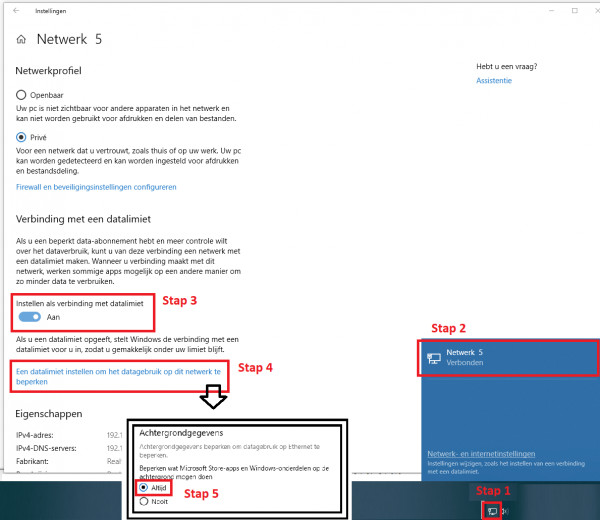
How do you ensure that you use as little data as possible? Windows 10 is known for its sneaky updates, which are difficult to turn off. However, there is a fairly simple trick to ensure that your computer uses as little data as possible. Click on the icon for your internet connection (amount or Wi-Fi) in the bottom right-hand corner of the taskbar. Then click on the active internet connection. Check "Set as connection with data limit": ON. ON
Click on "Set up a data limit to limit data usage on this network"Under 'Background data', check --> "Limit what Microsoft Store apps and Windows events are allowed to do in the background": "ALWAYS" on
This has been automatically translated into English
