Combined-event startgroup merge for just a few events:
See answer: https://www.athletics.app/faq/?qa=40/splits-meerkamp-startgroepen-groepen-specifieke-onderdelen&show=40#q40
Combined-event startgroup merge for all events:
You can merge different categories into 1 startgroup. For the all-around, this means merging the athletes for all events.
- Following the Wizard, step 10, "Configure Startgroups," set the startgroups to "Manually Manage."
- Then you can manually create new startgroups in the Startgroups overview and give them a name of your choice, for example, "Juniors A & B Combined-events.
- Once you have created a startgroup you need to add competitors to the startgroup, this can be done in 3 ways:
- Add Competitors by Category
Click on the startgroup and then click on 'Add Competitors', this way you can quickly add many competitors from specific categories.
- Quickly add many specific competitors
Go to the registrations overview, select 1 or more competitors you want to add to the startgroup, then click on '[choose action]' and 'add to startgroup' then select the relevant startgroup.
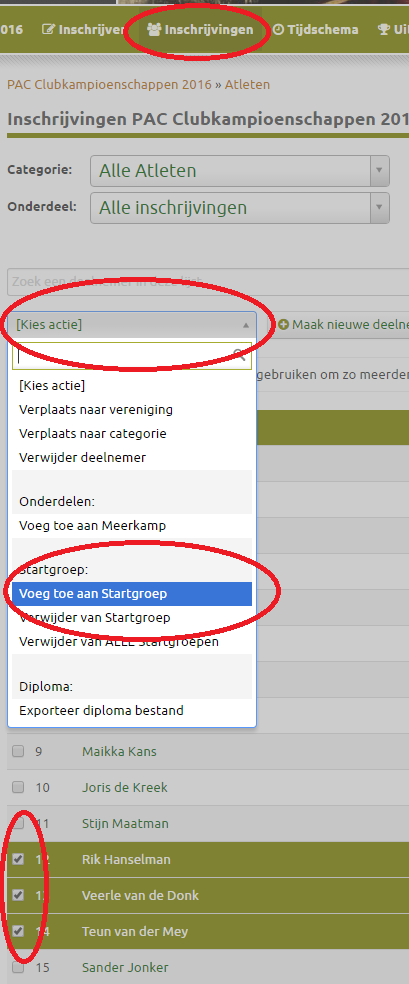
- Edit competitor by competitor
Edit a competitor and change that competitor's startgroup
This has been automatically translated into English
