In cooperation with the Dutch Athletics Federation, we collect all competition results from all over the Netherlands.
The competition regulations of the Dutch Athletics Federation, article 1 paragraph 6 of the competition regulations 2016-2017, state that you must upload the results within a week after the competition.
Results can be uploaded in different formats. Right now we support 3 formats:
- Athletics Manager (csv export)
- WAP
- COSA (single results only, no combined-events exports)
- ATDOR (single results only, no combined-events exports)
- Excel (example below)
To upload results follow these steps:
- Log in to Athletics.app (with the account you used to create the competition for the calendar)
- Open the competition via Competitions>My Competitions
- Go to the drop-down menu on the right and click on 'Upload Results'.
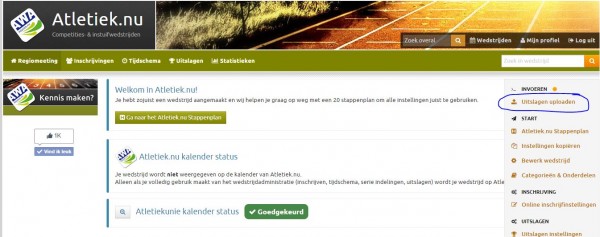
- Choose your administration package.
- Press start and follow the instructions.
- Check to make sure the results have been properly transferred into Athletics.app. If something went wrong, please contact support@Athletics.app
If the upload did not succeed the first time, you can always try again. Please check the box " Delete all existing results of the competition in Athletics.app" before starting the upload, otherwise results may be saved twice.
The Excel upload feature allows you to upload from many different formats. An example is attached below. To get this into Athletics.app, select all fields in Excel and copy this into Athletics.app.
It is important that each row contains the category and part name.
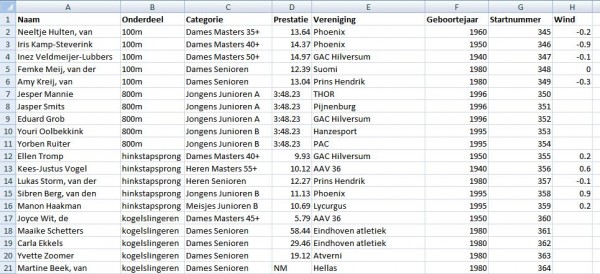
The columns below are possible (columns in bold are required)
- First name (or whole name)
- Initials
- Surname
- License number *
- Event
- Category
- Performance
- ?Wind
- Association *
- Date of Birth/Year *
- Bib numbers
- Sex
See also: Are there any sample excel files for importing race results?
This has been automatically translated into English
