You can place athletes in a startgroup in several ways:
- One-by-one (edit athlete)
- By category/club
- A specific selection of athletes
1) One-by-one (edit athlete)
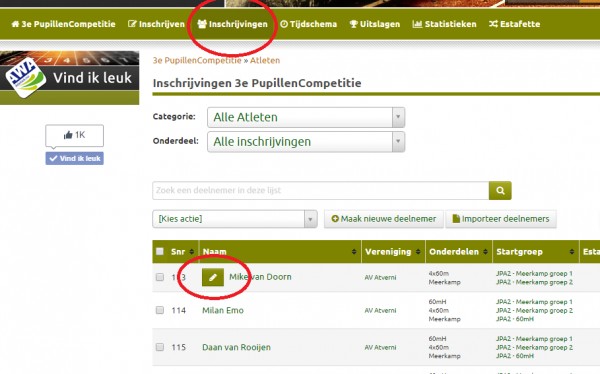
- Go to Registrations (top green bar)
- Edit an athlete
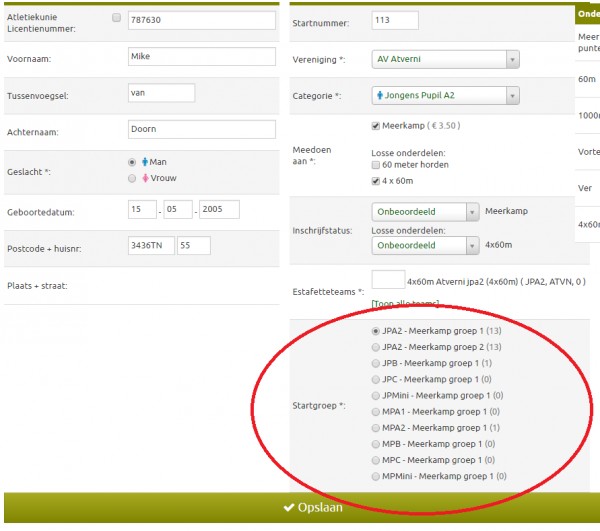
- Select the startgroup(s) for the athlete and save the changes.
2) By Category/Association
- Go to the appropriate startgroup, in which you want to place multiple athletes:
- Click "Add Competitors" there, and select the categories and clubs whose competitors you want to add to this startgroup
3) A specific selection of athletes
- Go to 'Registrations' (top green bar)
- Select the competitors you want to move to a startgroup
- Click on 'Choose Action' (top left of the table)
- Select 'Select Action' (top left of the table)
- Select 'Add to Startgroups' 'Add to startgroup'
- Select the startgroup to which to move the competitors
- Click 'Confirm' (I'm sure I want to move the competitors)
This has been automatically translated into English
