Since February 23 2016, merging startgroups is possible.
In this example, we are going to merge the 60m of two groups JPA1.
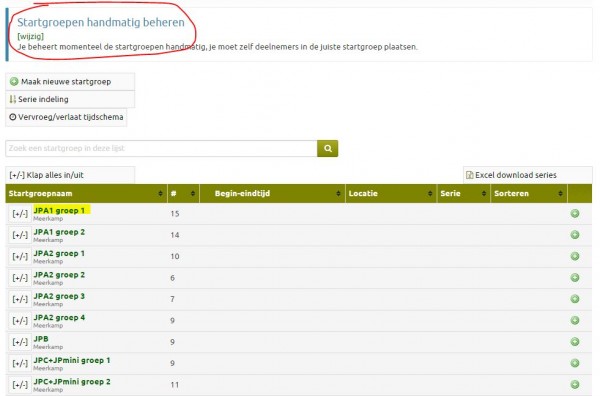
Go to the Startgroups page. Check that the startgroup is set to 'Manually Manage'. You can change this from here if necessary.
Now click on the name of a startgroup (in this case, JPA1 group 1).
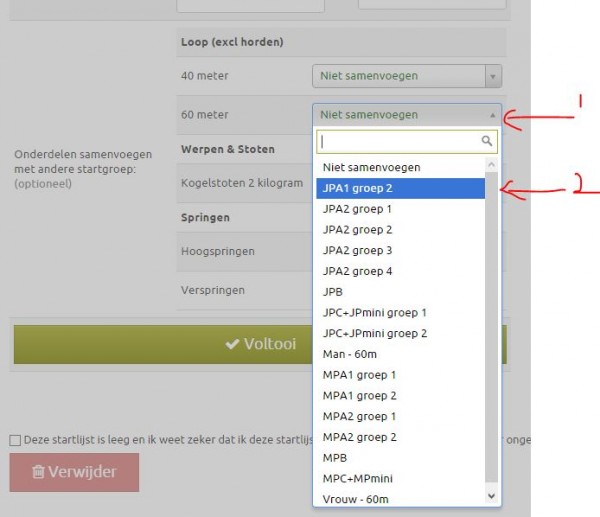
In the next menu, click on 'Edit this Startgroup'. Scroll down so you ll see the 'Merge Events with other Stargroup' option. Here we want to merge the 60 meters with 'JPA1 group 2'. You can do this by clicking on this startgroup in the list next to '60m' (see below). Then click then click 'Finish' to save this.
Now the 60m of these two startgroups is merged. The other events will still be done separately.
Combined-event events can also be merged with single events this way. This way athletes who do not do combined-events can finish the event simultaneously with the combined-events.
This has been automatically translated into English
