How do I split combined-events startgroups into 2 groups for specific events?

0 votes
asked Nov 17, 2015 in Startgroups / Timetable by Athletics.app Customer Service
In the pupils, we are going to split some categories into two groups because there are just too many athletes to finish in one group. This includes the technical numbers high and bullet.

The classification I do manually and is based on, that pupils of one club come in the same group.

Can I now after for example the mpa1 the startgroups

MPA1 60M
MPA1 GROUP 1 BILL
MPA1 GROUP 2 BOWL
MPA1 GROUP 1 HIGH
MPA1 GROUP 2 HIGH

make? For the 60m, all athletes can be assigned to heats at the same time.

Or is it more convenient to

MPA1 group 1 and MPA1 group 2? Then the heats 60m are also per group.

I understand, that in the results there will remain one results combined-event MPA1.

This has been automatically translated into English

1 Answer

0 votes
answered Feb 25, 2016 by Athletics.app Customer Service
 
Best answer

Since February 23 2016, merging startgroups is possible. 

In this example, we are going to merge the 60m of two groups JPA1.

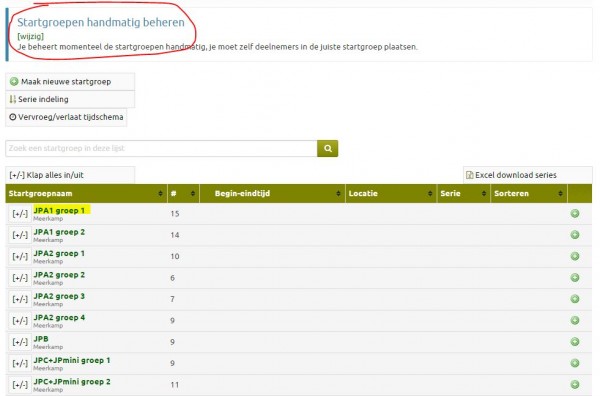
Go to the Startgroups page. Check that the startgroup is set to 'Manually Manage'. You can change this from here if necessary. 

Now click on the name of a startgroup (in this case, JPA1 group 1).
In the next menu, click on 'Edit this Startgroup'. Scroll down so you ll see the 'Merge Events with other Stargroup' option. Here we want to merge the 60 meters with 'JPA1 group 2'. You can do this by clicking on this startgroup in the list next to '60m' (see below). Then click then click 'Finish' to save this.
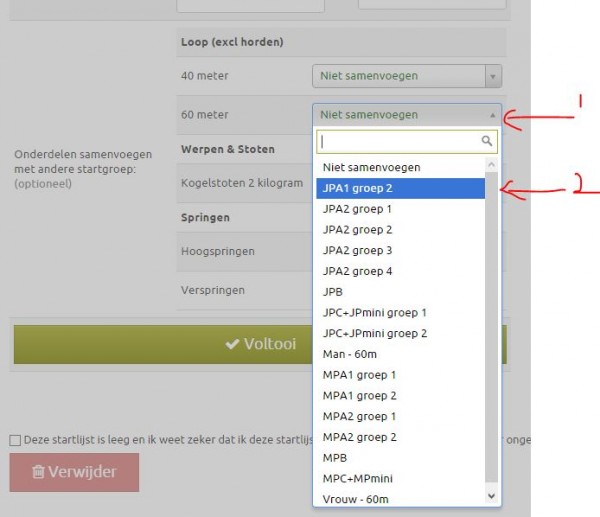
Now the 60m of these two startgroups is merged. The other events will still be done separately.

Combined-event events can also be merged with single events this way. This way athletes who do not do combined-events can finish the event simultaneously with the combined-events.

This has been automatically translated into English

...