You can indeed have Athletics.app work with a "registration status" per athlete per registered event. You can then see in Athletics.app who has registered / who has picked up his/her bib number.
This is especially useful if you work with reserve lists, so that you can admit reserve athletes after a certain time, because some other athletes have not reported (on time). This is also often used if you want to make optimal heat divisions, so that you can be sure that you do not have athletes in your heat who did not show up after all.
What do you need?
- A computer with an internet connection at the place where the athletes pick up their bib numbers.
- Optional: A barcode scanner, for example: Motorola LS2208 Barcode Scanner
- Optional: Bib numbers with a barcode (Athletics.app generates this for you)
How do I set up Athletics.app?
- Go to the right drop-down menu and click on "Online registration settings".
- Check the following: "Register which athletes have collected their bib numbers (report per event)": YES
- Click on "Save".
- An additional option "Register" will now appear in the right-hand drop-down menu, where you can register athletes.
How do I register athletes?
- In the right-hand drop-down menu, go to "Register"
- Click on the field with "Bib number".
You now have 2 options:
a) Enter the athlete's bib number with your keyboard and click on Enter. The athlete has been registered.
b) Scan the barcode on the bib number with a barcode scanner. The athlete has been registered.
Once the athlete has been registered, you will immediately see the events for which the athlete has been registered:
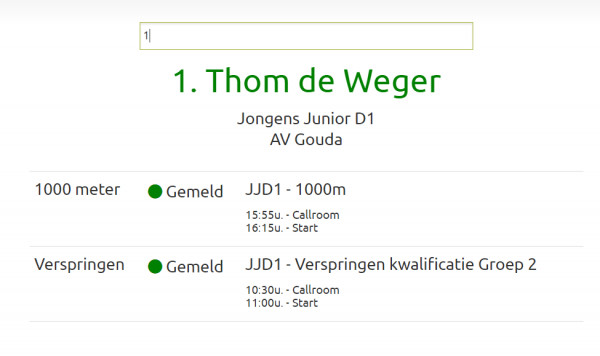
It is also possible that an athlete has registered, but has not yet paid, you will receive a notification of this before you can register the athlete:
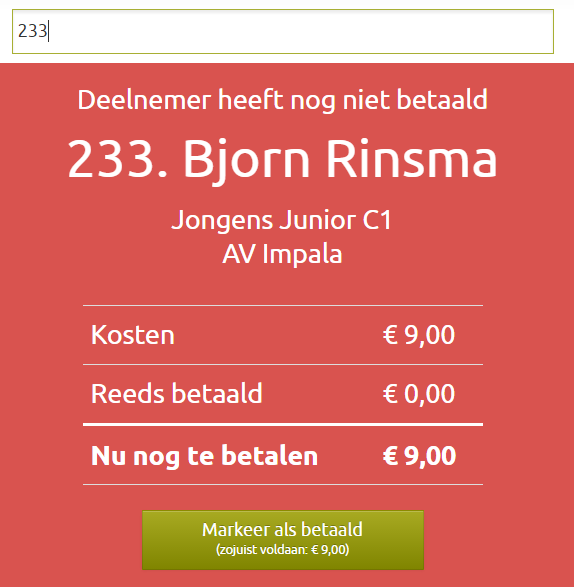
This has been automatically translated into English
